The only compatible energy meter that can be connected to the Solis S6-EH2P(9.6-16)K03-SV-YD-L-US hybrid inverter series is the CHINT DTSU666 meter. There is a similar meter that has a “-H” at the end and looks like CHINT DTSU666-H, which is not compatible with this inverter. The “H” stands for Huawei and only works with Huawei inverters, not with Solis inverters.
This energy meter must be purchased separately installed if one of the three following conditions are met:
1. The CTs must be installed more than 16 feet from the inverter. Since the included CT wires are about 16.16 feet long and they cannot be extended, if the distance between the inverter and CTs is to be greater than 16 feet, the CHINT meter must be installed. The meter connects to the inverter with RS485 and can be run 300 feet without issues.
2. The maximum system current is greater than 500A. Since the CTs included are rated for 250A, if the maximum system current is greater than 500A, the meter kit must be purchased. The meter kit includes 600A-rated CTs. There is a second meter kit that includes 1000A-rated Rogowski coils.
3. Rigid CTs will not fit around the current carrying conductors. If the conductors that connect the utility to the inverter or to the system are large, flexible CTs (Rogowski coils) may need to be installed. The second meter kit includes Rogowski coils that are rated for 1000A.
Optional Meter Kits - Sold Separately by Solis Distribution Partners
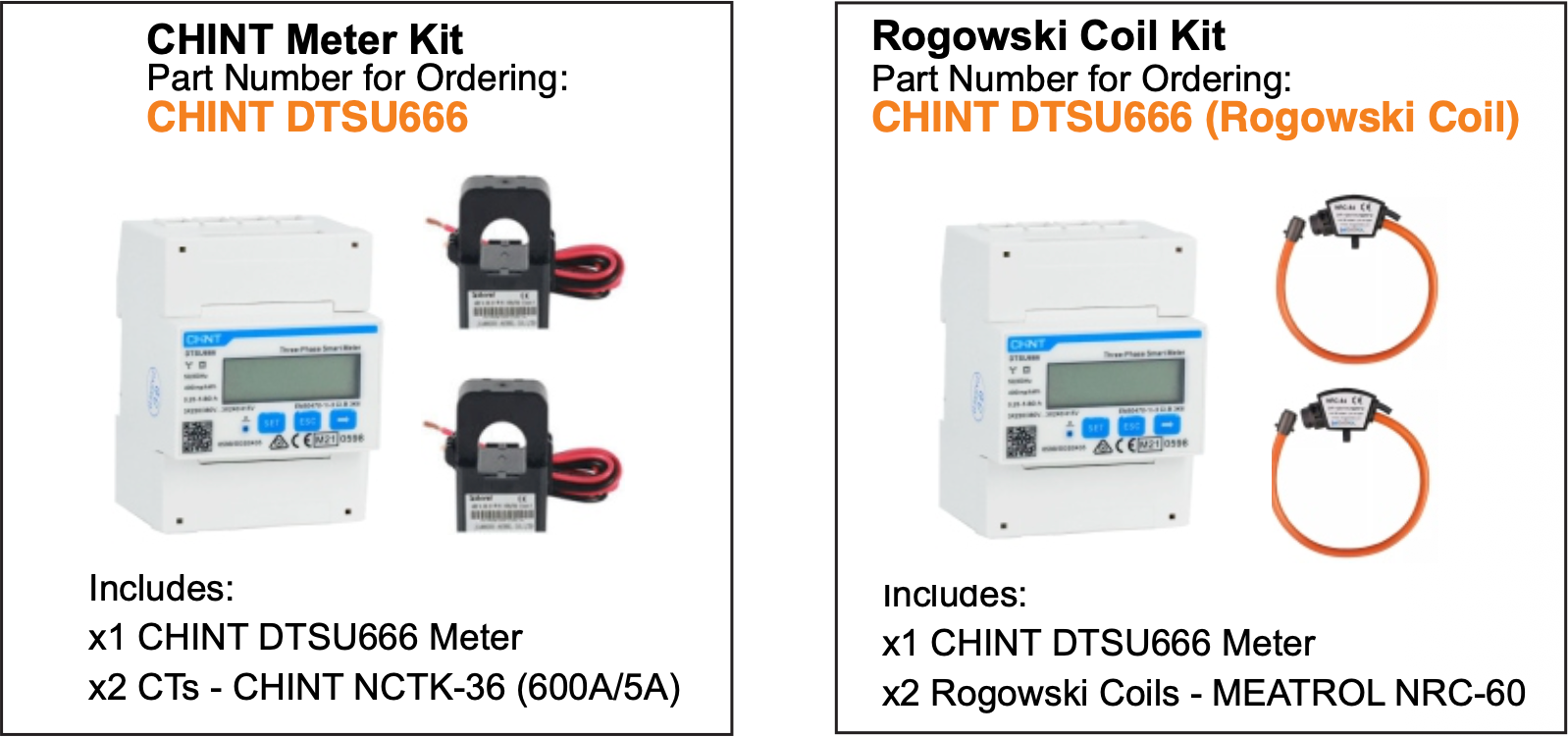
Standard Meter Kit
SKU: CHINT DTSU666
Included Components: x2 CTs rated for 600A/5A and x1 CHINT DTSU666 meter
Rogowski Coil + Meter Kit꞉
SKU: CHINT DTSU666 (Rogowski Coil)
Included Components: x2 Rogowski coils rated for 1000A and x1 CHINT DTSU666 meter
Note: No other meter type can be used with this inverter. That includes the CHINT DTSU666-H meter, which is the Huawei version of the DTSU666 meter. The -H version will not work with any Solis inverters as it is specific to Huawei products. If you are purchasing this meter on your own, please be sure it is the CHINT DTSU666 meter without the "-H”.
Installation Steps
The attached manual explains how to install this meter with the inverter.
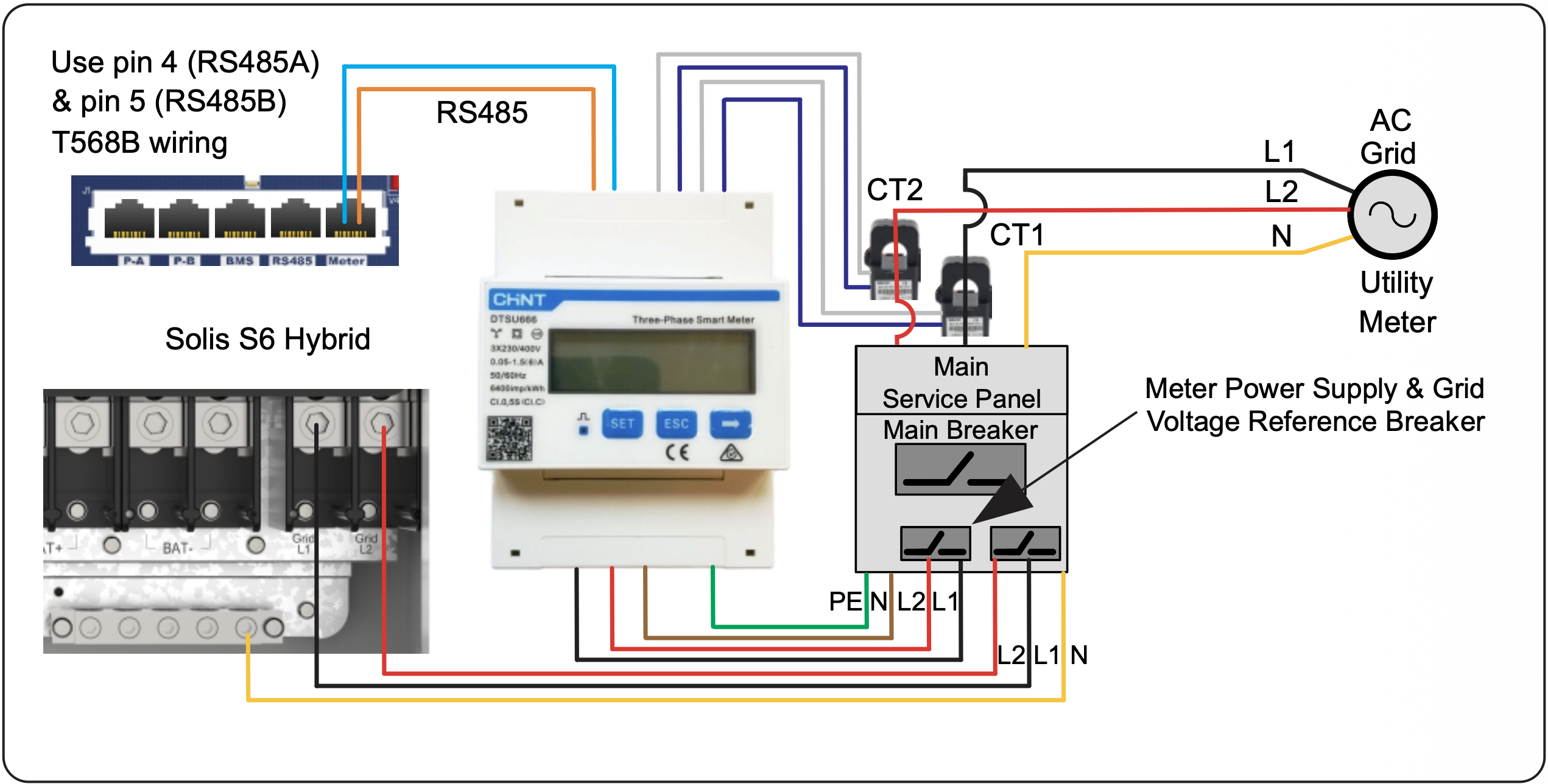
The CTs will connect to the CHINT meter instead of to the inverter. The meter will need split‑phase (240V L1-L2-N) power from a 2‑pole (15A) circuit breaker. The diagram below shows how to install the meter and CTs. Connect the meter to the inverter with a standard ethernet cable as the meter and inverter both have RJ45 (ethernet) ports. If you are making a cable, use pins 4 (RS485A) and 5 (RS485B) on both ends. It is recommended to use a factory-made cable since handmade cables can be made improperly. Be sure to use an ethernet cable tester if you are making your own cable. The “Meter” RJ45 port of the inverter must be used. Do not use the two “Meter” pins, these are not meant for the external energy meter. The meter
Was this article helpful?
That’s Great!
Thank you for your feedback
Sorry! We couldn't be helpful
Thank you for your feedback
Feedback sent
We appreciate your effort and will try to fix the article