Three-Phase Configuration of Split-Phase Hybrid Inverters
Contents
- Background
- System Solution
- Applicable Models & FW Version
- Functional Instructions
- Setting Path
- 5.1 LCD Setting Path
- 5.2 SolisCloud Setting Path
1. Background
In the North and Latin American markets, both split-phase (120V/240V) and three-phase (120V/208V) grid configurations are widely utilized. To eliminate the need for distributors and installers to stock multiple specialized inverter types, this solution allows a single split-phase inverter model to be configured to meet both grid application requirements.
2. System Solution
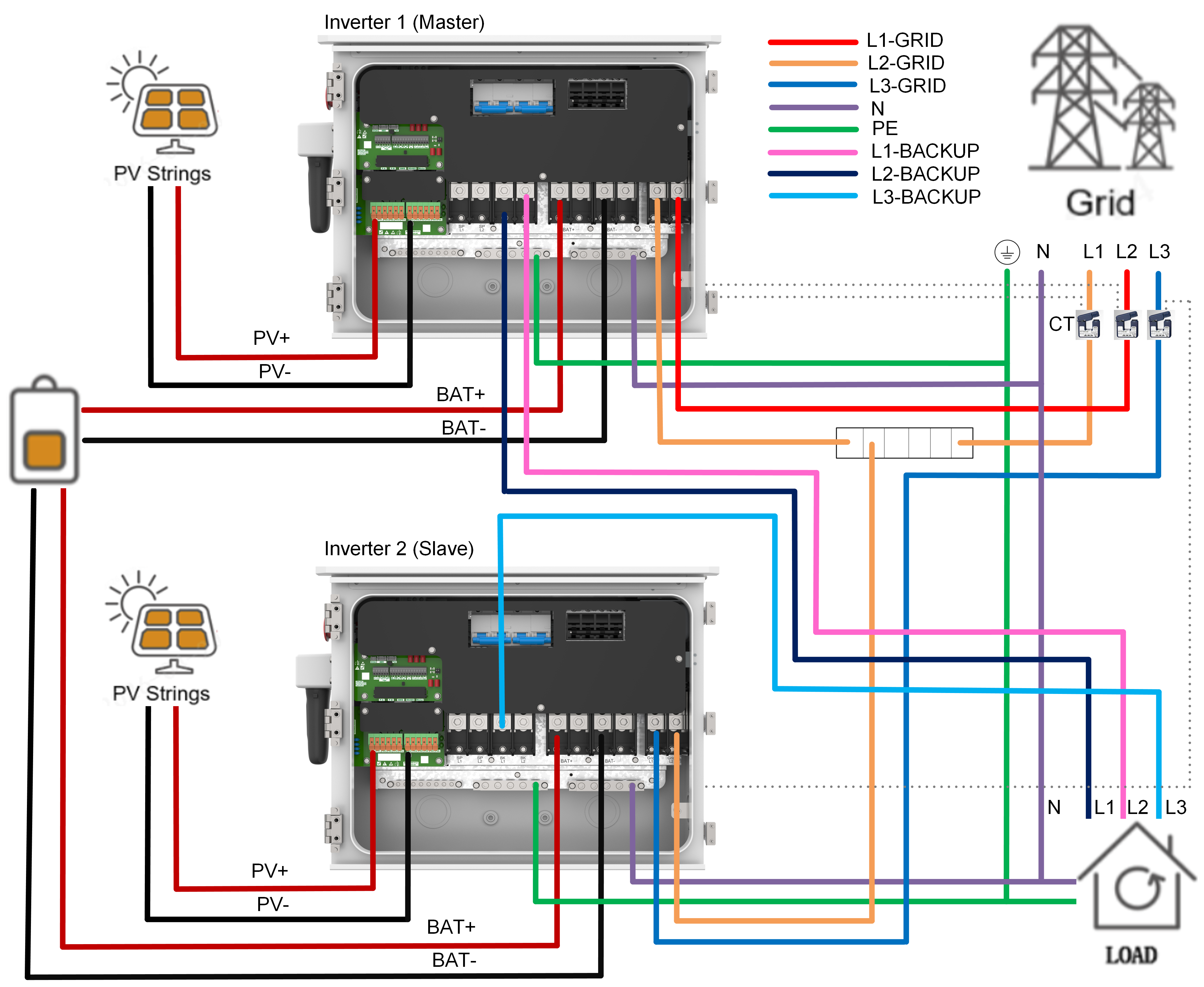
This solution utilizes two 16kW split-phase hybrid inverters connected in parallel to form a stable three-phase (120V/208V) output connection. The system must contain exactly two inverters, no more or less.
Transformer Compatibility Notice: This connection method applies strictly to Wye-type 208Vac transformers. It is not compatible with Delta 208Vac configurations.
Wiring and Terminal Designations: To ensure proper grid-tied synchronization and to comply with specific patent restrictions, the physical wiring must adhere strictly to the following parameters.
Power-Carrying Terminals (Active Generation):
Master L1 Connection: Connect the Master inverter's L1 Grid terminal to Grid Phase L1.
Master L2 Connection: Connect the Master inverter's L2 Grid terminal to Grid Phase L2.
Slave L1 Connection: Connect the Slave inverter's L1 Grid terminal to Grid Phase L3.
Signal / Auxiliary Power Only:
Slave Auxiliary Power Supply (Slave L2 Grid): The L2 Grid terminal of the Slave inverter must be physically jumped/connected to the L1 Grid terminal of the Master inverter. This connection is utilized solely to draw grid power for the Slave inverter's internal AC auxiliary power supply and does not participate in active three-phase grid-tied generation.
Unused / Restricted Terminals:
Slave Backup Terminal Restriction: The L2 Backup terminal on the Slave inverter must not be wired and must remain completely free of any load.
Additional System Requirements:
Current Transformer (CT) Orientation: A dedicated CT must be installed on each of the three active grid phases, with the physical arrows pointing toward the grid.
Communication Link: The physical parallel communication loop between the Master and Slave inverters must be connected securely.
3. Applicable Models & FW Version
Note: The firmware supporting 208V will be released at the end of July. It is not available yet.
Product series | Firmware Version |
S6-EH2P(9.6-16)K03-SV-YD-L-US | DSP:July 30th ARM:TBD LCD:TBD |
4. Functional Instructions
This function is explicitly designed to integrate split-phase units into a three-phase 120V/208V grid. Under normal operating parameters, the internal inverter operational logic is nearly identical to a standard 120V/240V split-phase connection.
Total Export Power Sizing Because the Slave L2 line is excluded from active generation to satisfy the wiring and patent parameters, the maximum total export power of the paired system is restricted to 75% of the combined theoretical capacity of two standard parallel units.
Example: When combining two 16kW split-phase inverters (which would normally total 32kW in standard parallel), the maximum total export capacity in this three-phase configuration is 24kW. This power is balanced symmetrically across the lines, meaning each individual phase can export up to 8kW.
5. Inverter LCD Settings Configuratin
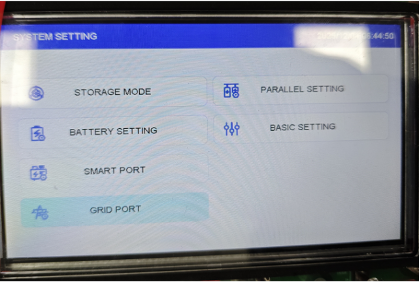
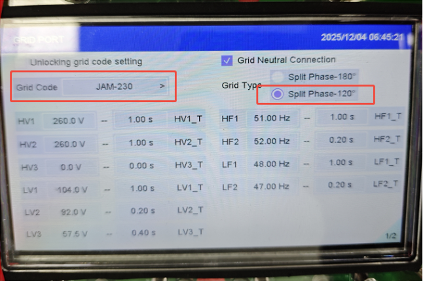
1. Grid Type Selection (Configure on each inverter individually)
- Navigate to the "Grid Port” settings menu on the LCD by pressing enter, down to System Settings, pressing enter again, and then going to “Grid Port”. Use the Up/Down buttons navigate.
- Grid Code Selection: Select "UL 208V-18" (for US compliance).
- Grid Type Selection: Select Split Phase -120°.
2. Master Inverter Configuration
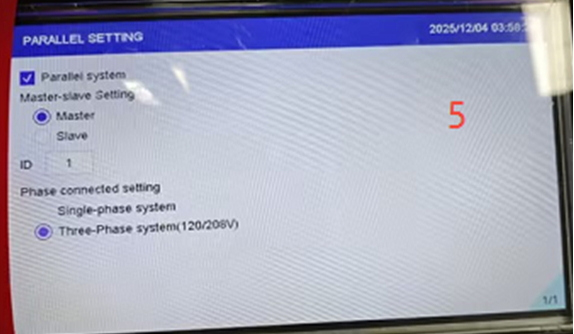
- Navigate to the Parallel Setting menu.
- Check the box to enable the Parallel System.
- Set Master-Slave Setting to Master.
- Set Phase Connected Setting to Three-Phase system (120V/208V).
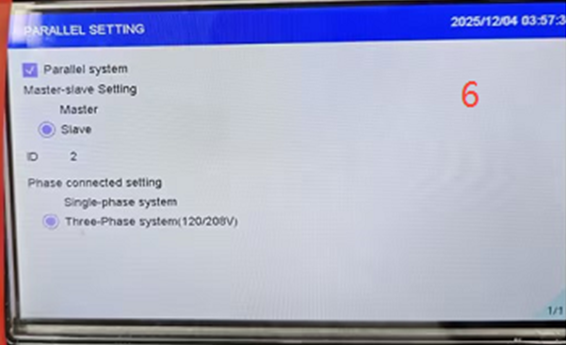
3. Slave Inverter Configuration
- Navigate to the Parallel Setting menu.
- Check the box to enable the Parallel System.
- Set Master-Slave Setting to Slave.
- Set Phase Connected Setting to Three-Phase system (120V/208V).
Was this article helpful?
That’s Great!
Thank you for your feedback
Sorry! We couldn't be helpful
Thank you for your feedback
Feedback sent
We appreciate your effort and will try to fix the article