Solis AI Assistant is live in SolisCloud, the Solis monitoring portal. Ask it a question in plain language, add a photo or pick one of your plants, and it answers in seconds. It is already a capable troubleshooting and support tool, and Solis is building more on top of it.
What Solis AI Assistant Does Today
The AI Assistant is built into SolisCloud. Open it from the robot icon in the top bar of any SolisCloud page.

- Plain-language chat: type a question the way you would ask a technician, for example "I'm having daily arc fault alarms, what do I do?" or "What is the alarm IGFOL-F?"
- Upload Image: attach a photo of an inverter screen, an alarm, a label or a wiring connection, and the assistant takes it into account.
- Select Plant: point the assistant at one of your plants (sites) so its answer is based on that system.
- Troubleshooting and O&M: it explains alarm codes, likely causes and the checks to make, step by step.
- Installation and monitoring questions: it covers setup, SolisCloud features and everyday questions such as "App data not refreshing, what to do?"
- Solis AI smart mode: it can walk you through enabling Solis AI energy optimization where it is available.
- History and My Favorites: every chat is saved and searchable, so you can come back to an earlier answer or save the useful ones.
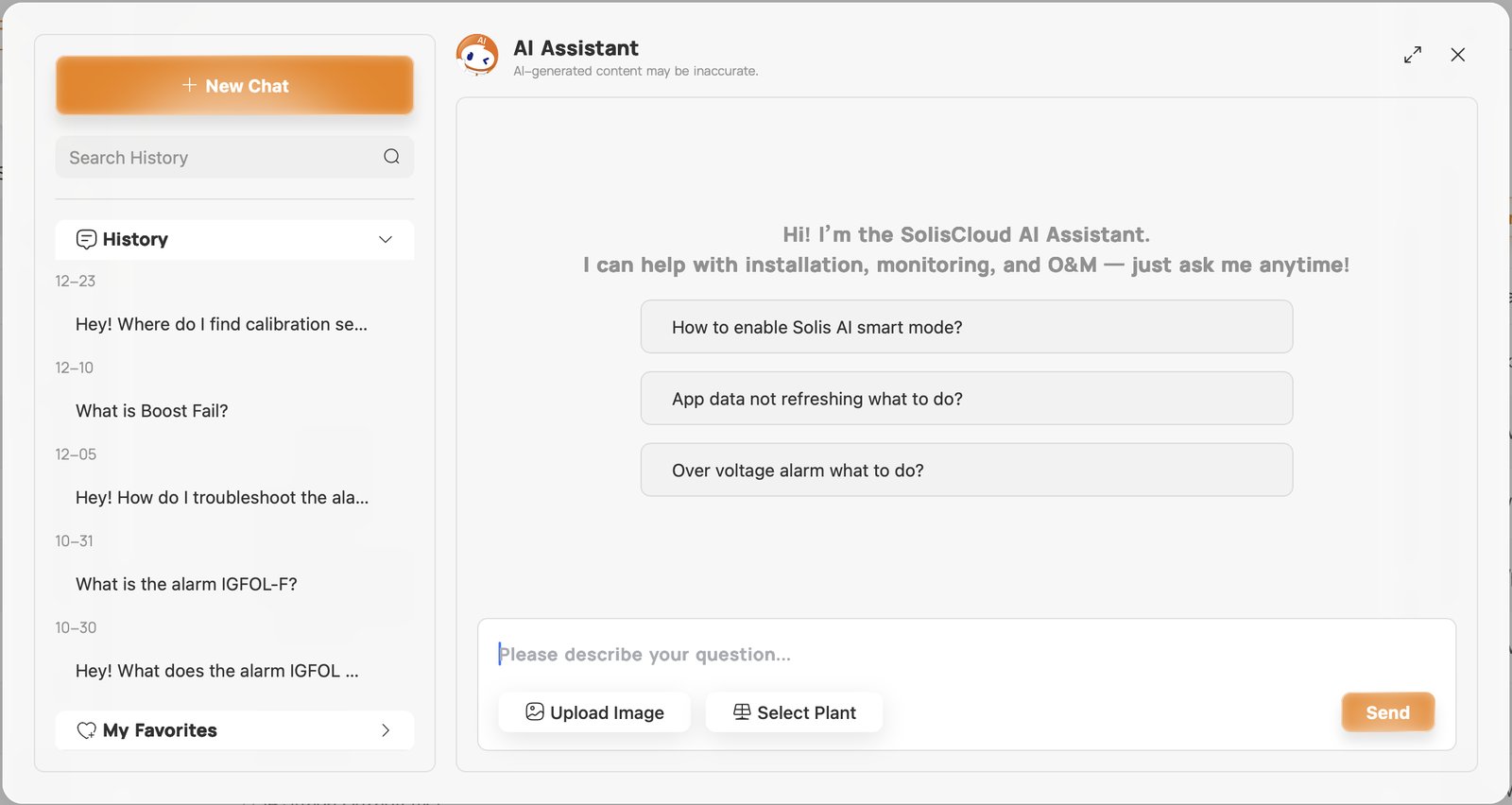
Answers usually arrive in seconds. Like any AI tool, the assistant can make mistakes, and the chat window says so. For safety-critical work, confirm against the product manual or with Solis support.
How to Use It
- Log in to SolisCloud and click the AI Assistant icon (the robot) in the top bar.
- Click New Chat, or tap one of the suggested questions to get started.
- Type your question in the box at the bottom.
- Optional: click Upload Image to add a photo, or Select Plant to choose the site the question is about.
- Click Send. Ask follow-up questions in the same chat; the assistant remembers the conversation.
- Find earlier chats under History, or save a useful one to My Favorites.
Tips for the Best Answers
- Give the exact alarm name or code as it appears on the inverter or in SolisCloud.
- Select the plant when the question is about a specific system, so the assistant knows the equipment involved.
- Add a photo when something is easier to show than to describe, such as a screen, a nameplate or a connection.
- Say what you have already checked, so the next steps build on that.
- Keep one topic per chat; start a new chat for an unrelated question.
Today vs. What's Coming
The assistant you can use today is the foundation; the planned tools build on it.
| Capability | Today | Coming |
|---|---|---|
| Plain-language Q&A on installation, monitoring and O&M | Available | Broader and deeper answers as the knowledge base grows |
| Alarm explanations and troubleshooting steps | Available | A dedicated troubleshooting agent that guides you to a fix or hands a complete case to a Solis technician |
| Photo upload and plant (site) selection | Available | Continued improvement |
| Chat history and favorites | Available | — |
| Solis AI energy optimization (smart mode) | Available in supported regions | Ongoing improvements |
| Guided SolisCloud onboarding and tours | Planned | An assistant that welcomes new users and shows them around SolisCloud |
| Commissioning support | Planned | An agent that explains each setting and helps configure the system from a plain description of what you want it to do |
| Knowledge source | Official Solis user manuals | Manuals kept in step with the versions on the Solis website |
What Solis Is Working On
Solis has a dedicated team developing the next generation of Solis AI. The goal is simple: make it fast and easy for installers and owners to get accurate answers and get systems running right.
- AI Assistant for general support: the next tool in line. It will be an expert on SolisCloud: it greets new users, asks what they want to do (explore the site, create a plant, add members to an organization, or something else), and can give a guided tour of the platform, even before you have a plant.
- Troubleshooting agent: an expert on every Solis alarm code and the most common system issues. It will guide you either to a complete fix or to a Solis technician, with all the details already organized so you don't have to start over.
- Commissioning support agent: describe what you want the system to do, for example "no export, self-use, with generator backup on the Smart Port," and the agent will explain the settings involved, ask what it needs to know (such as generator start and stop SOC), and help configure them.
- Accurate, current knowledge: the assistant draws on official Solis user manuals, and Solis is aligning its knowledge base with the manuals published on the Solis website, so answers reflect the latest documentation.
These tools are in development, and Solis will announce them as they become available. Features and timing may change.
Was this article helpful?
That’s Great!
Thank you for your feedback
Sorry! We couldn't be helpful
Thank you for your feedback
Feedback sent
We appreciate your effort and will try to fix the article