Introduction
The S6-EH1P(3.8-11.4)K-H-US high-voltage residential hybrid inverter series can be installed as a grid-tied PV string inverter that is “battery-ready”. What “battery-ready” means is the inverter can be initially installed with only PV. A battery can be added to the inverter as a later date, as long as it is officially compatible (matched) with the Solis inverter. This article explains how to install the Solis S6 HV hybrid as a grid-tied only PV string-inverter.
We will start out with the most basic type of system and then get more complex as more equipment is added.
Pros of Using S6-EH1P(3.8-11.4)OK-H-US hybrid as a grid-tied PV-only inverter
- Battery-ready: The inverter can be installed without a battery using only PV and then a battery can be added in the future.
- PV-Only Backup: It is possible to utilize backup with PV only and no battery. There are limitations to this as there must be more PV power available than load consumption on the backup side.
- Consumption/Export power included: Every inverter comes with an energy meter and CTs for consumption and export power monitoring. The Solis “4G” grid-tied inverter does not include this equipment and must be purchased separately.
Cons of Using S6-EH1P(3.8-11.4)OK-H-US hybrid as a grid-tied PV-only inverter
Complexity and reliability: This inverter is relatively more complex and prone to alarms or issues compared with the 4G model. As a result, many feel more confident installing the simpler, more familiar 4G inverter.
Section A: Note on Paralleling Multiple Units Together
There is a distinction that must first be made. That distinction is whether the grid ports of the inverters will be connected in parallel or the backup ports will also be connected in parallel. If the backup ports/feature of this inverter are NOT being used, there is no limit to how many inverters can be connected in parallel.
Only if the backup ports will be used and connected in parallel, then there is a limit of x3 inverters that can be connected in parallel. This is due to inverters ability to grid-form when the grid has failed.
If your goal is to have multiple inverters share a single data logger, then the inverters must be connected together with parallel communication cables. However, if it is possible to install one logger per inverter, each inverter can be configured as a master inverter and they do not need to be connected together with communication cables.
Summary: If this inverter is being installed as a grid-tied PV only string inverter or even as an energy storage system that does arbitrage on-grid but does not function off-grid (backup mode) then you can connect as many units in parallel as you like. The limit of x3 inverters maximum in parallel only applies if the backup ports and feature of the inverter will be used. Inverters sharing a single logger must be connected together with parallel comms cables.
Section B: Grid-Tied Use-Case Scenarios
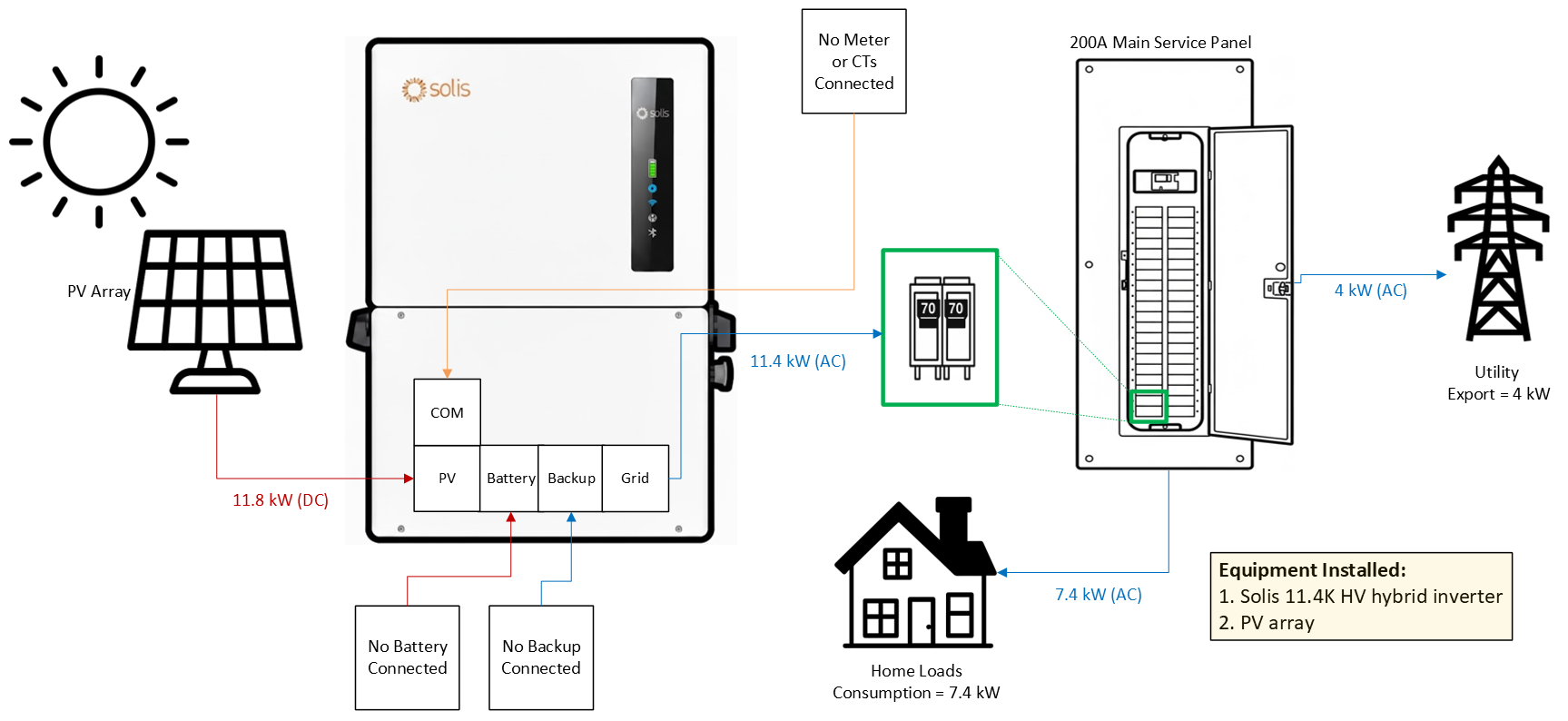
For each use case, there is a simple diagram. The purpose of the diagram is to:
1. Show what equipment is installed and what is not
2. Clarify which ports of the inverter are filled and which are left empty
3. Demonstrate how the power flows through the system
Section B1: PV Grid-Tied Only - Single Inverter System (Without Export Power Monitoring/Control)
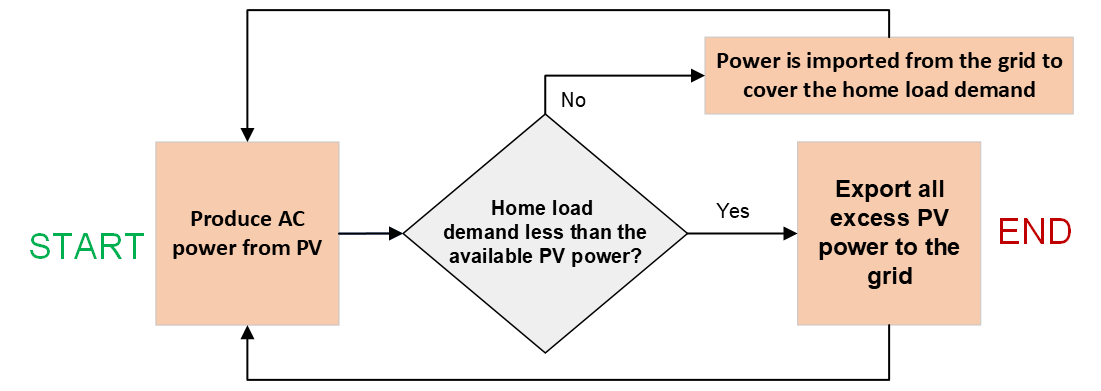
In this scenario, we are not using a battery and we are also not utilizing the backup port or feature of this inverter. The inverter converts DC power from the PV array to AC power. This power is then used by the home loads first. Any excess power gets exported to the utility. There is no regulation of export power in this case, because the meter and CTs have not been installed.
Diagram for PV-Only without Export Power Control:
Logic Table for PV-Only without Export Power Control:
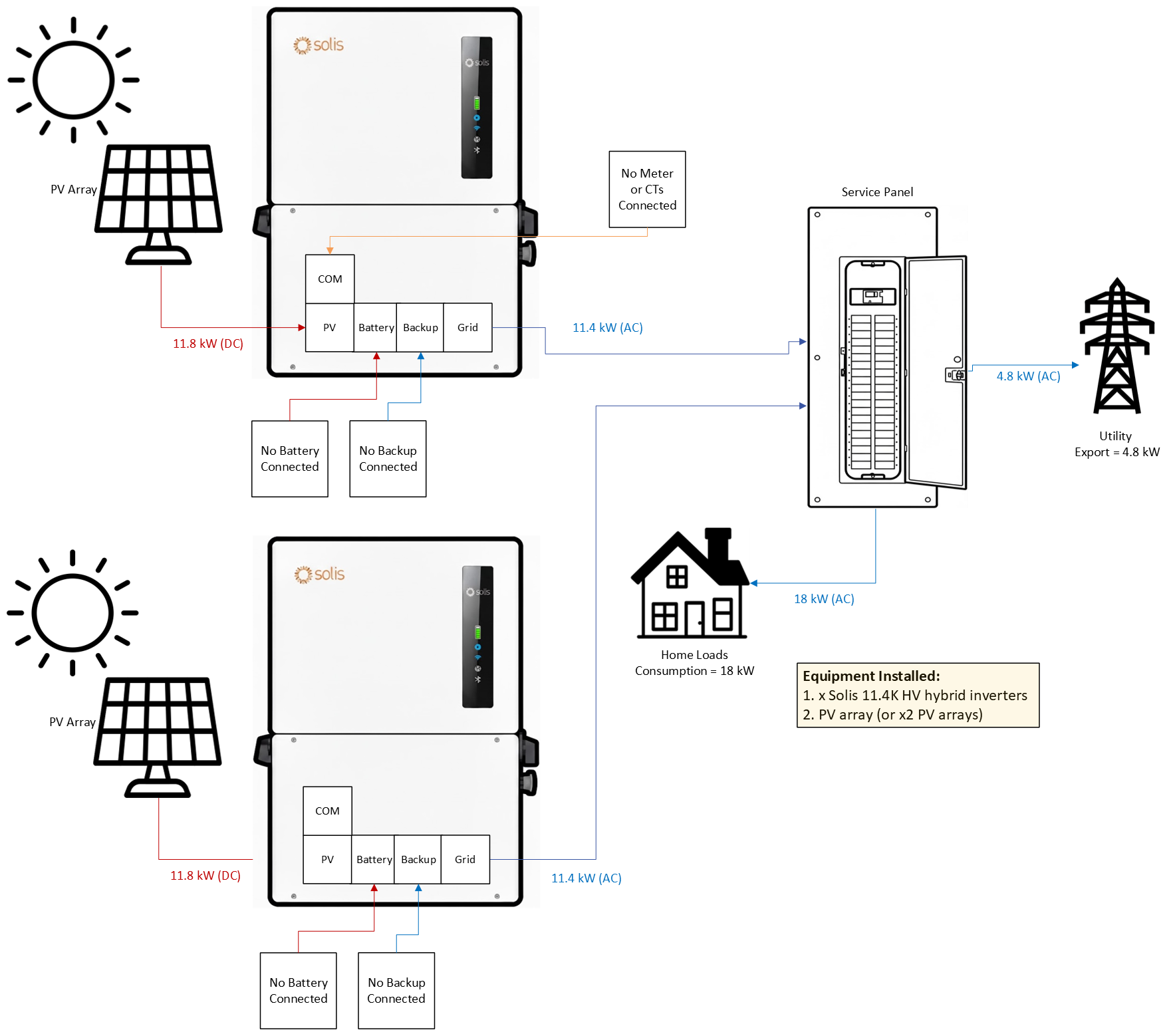
Section B2: PV Grid-Tied Only - Paralleling Multiple Inverters (without Export Power Monitoring/Control)
As stated earlier in Section A, there is no limit to how many inverters can be connected in parallel so long as the Backup ports of the inverter are left empty and the backup feature is not used. The Grid ports for each inverter will connect to an overcurrent protection device. These devices can be connected together in the same distribution center, such as a 200A service panel. The inverters do not need to be connected together with any kind of communication cable so long as as each inverter has a Solis data logger connected to it. If the goal is to have a single data logger communicate for multiple inverters, then they would need to be connected together according to page 56 of the full Installation Manual. If the inverters all have their own logger installed and connected to the internet, then all of the inverters can be left to their default settings configuration of being a master inverter.
Section B3: PV Grid-Tied Only - Single Inverter System (with Export Power Monitoring/Control)
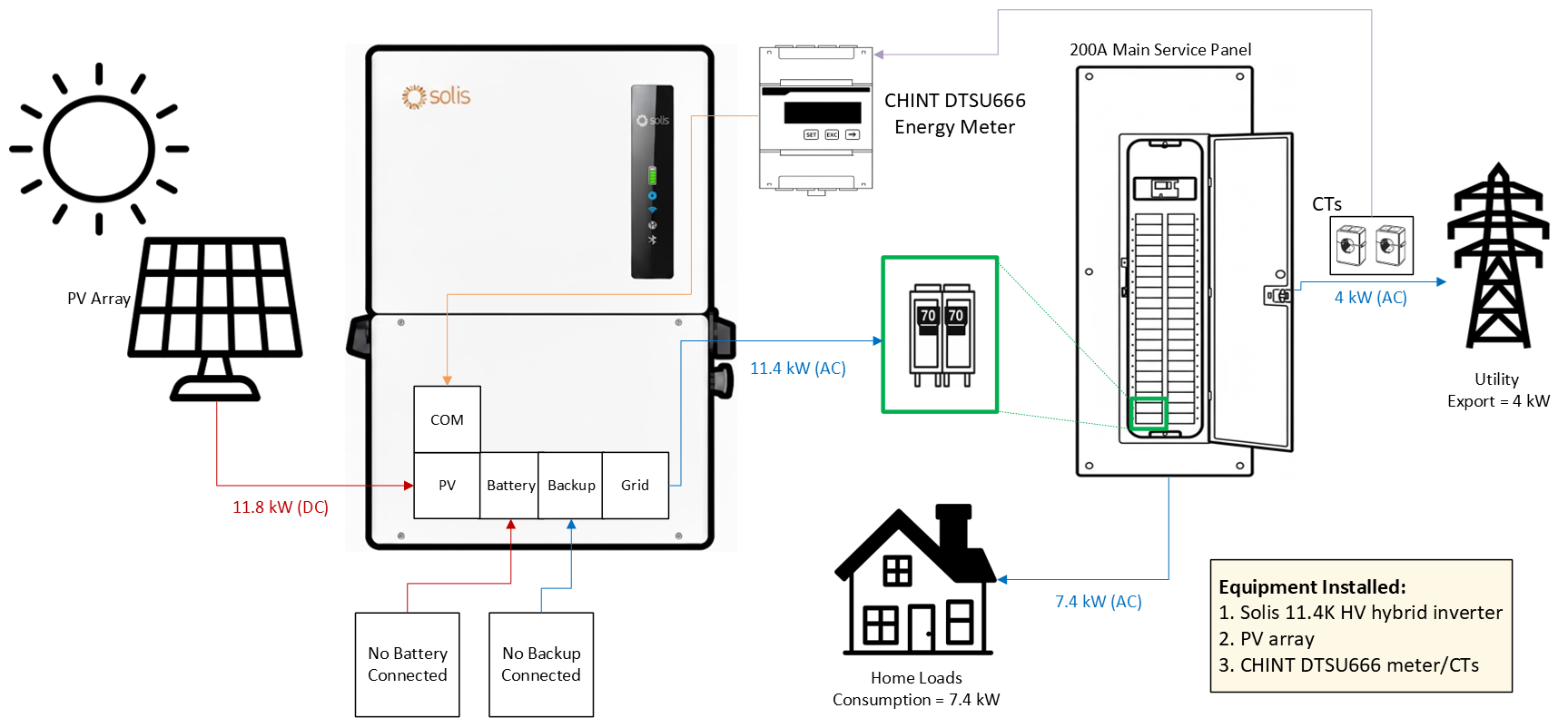
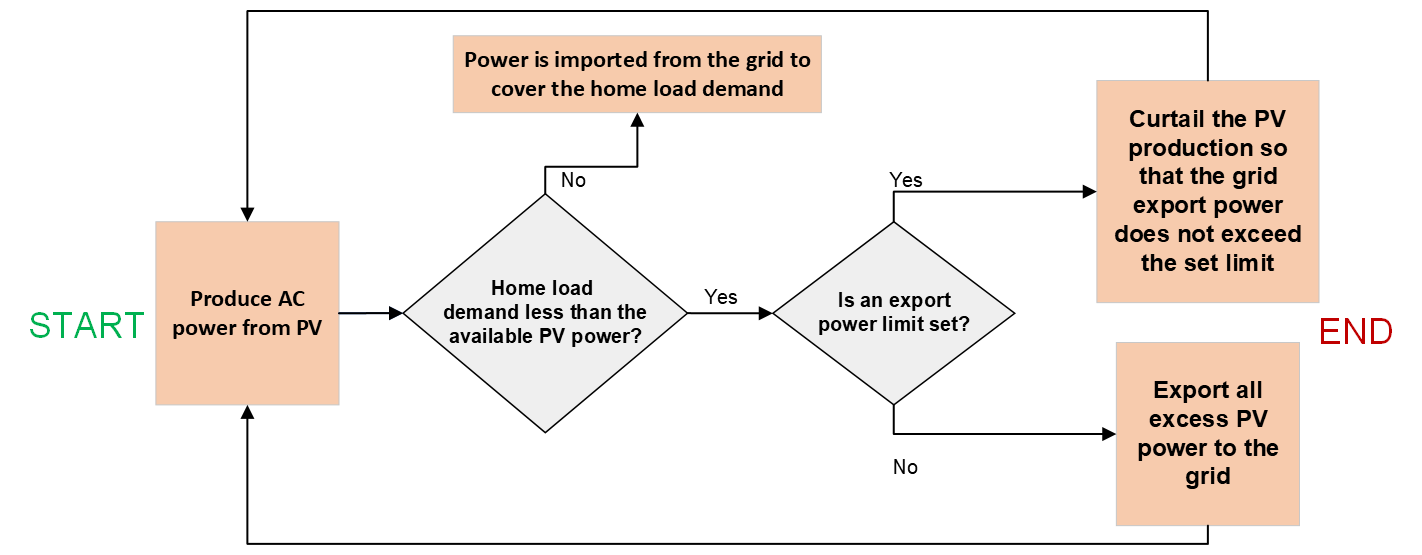
To have monitoring and control over power being exported to the grid, the energy meter and CTs must be installed. Also, if you want to have monitoring of home load consumption, you need to install the meter and CTs. Not installing the meter and CTs means you will only be able to see how much power the inverter is producing, but the other icons on SolisCloud such as grid export/import and home load consumption will be greyed out. The Installation Manual explains how to install the meter and CTs. The key difference with this system configuration is that the inverter will be able to regulate it’s output power as to not exceed the
set export power limit. If you do not need to monitor or control export power, you do not need to install the meter and CTs.
Diagram for PV Only with Export Power Control:
 Logic Table for PV Only with Export Power Control:
Section C: Configuring the Inverter Settings for Grid-Tied PV Only Operation (Remotely)
Note: Most likely, the settings will be configured locally through Bluetooth.
Pages 61 to 63 of the Installation Manual explain how to connect to the inverter on-site using the SolisCloud app and how to upgrade the inverter firmware.
Before configuring the settings, please be sure to upgrade the inverter firmware locally through Bluetooth or call in to our service team and request they push a remote firmware upgrade. The Solis data logger must be installed and connected to the internet prior to making this request.
Solis Support Team Phone Number: (866)438-8408 press 2 when you hear a machine voice
This Local Bluetooth Firmware Upgrade Guide explains how to upgrade the firmware on-site through SolisCloud.
Please watch this video: Using Solis S6 HV Hybrid as a Grid-Tied PV-Only Inverter. The video explains which settings should be configured and how to configure them for grid-tied PV only operation. However, the video shows how to do this remotely through SolisCloud. Please use the manual for steps on how to connect via Bluetooth and then use the video to understand how to properly configure the settings for grid-tied PV-only operation.
Was this article helpful?
That’s Great!
Thank you for your feedback
Sorry! We couldn't be helpful
Thank you for your feedback
Feedback sent
We appreciate your effort and will try to fix the article