Technical Bulletin
Applicable Regions:


January 14th, 2026
Subject: Explanation of PV-Only Backup Operation and Load Limitations
Bulletin Type: Informative
Audience: Installers, Service Partners, Homeowners
Products Affected: Solis S6-EH1P(3.8-11.4)K-H-US models
Firmware Version Required: HMI v.1308 & DSP v.0603
Effective Date: Immediate
Overview
Solis hybrid inverters are capable of providing 240 V split-phase backup power using PV alone, without a battery. In this mode, the inverter forms a local grid (“grid-forming operation”) using real-time photovoltaic energy as the sole power source.
Because there is no energy storage, all backup power delivered to loads must come directly and instantaneously from available PV generation. Should the load consumption exceed the available PV power, the inverter will trip off disconnecting the home loads from power. This strictly enforces the ’temporary shutdown’ behavior mentioned in Section 4.4 of the User Manual.
Observed Behaviors
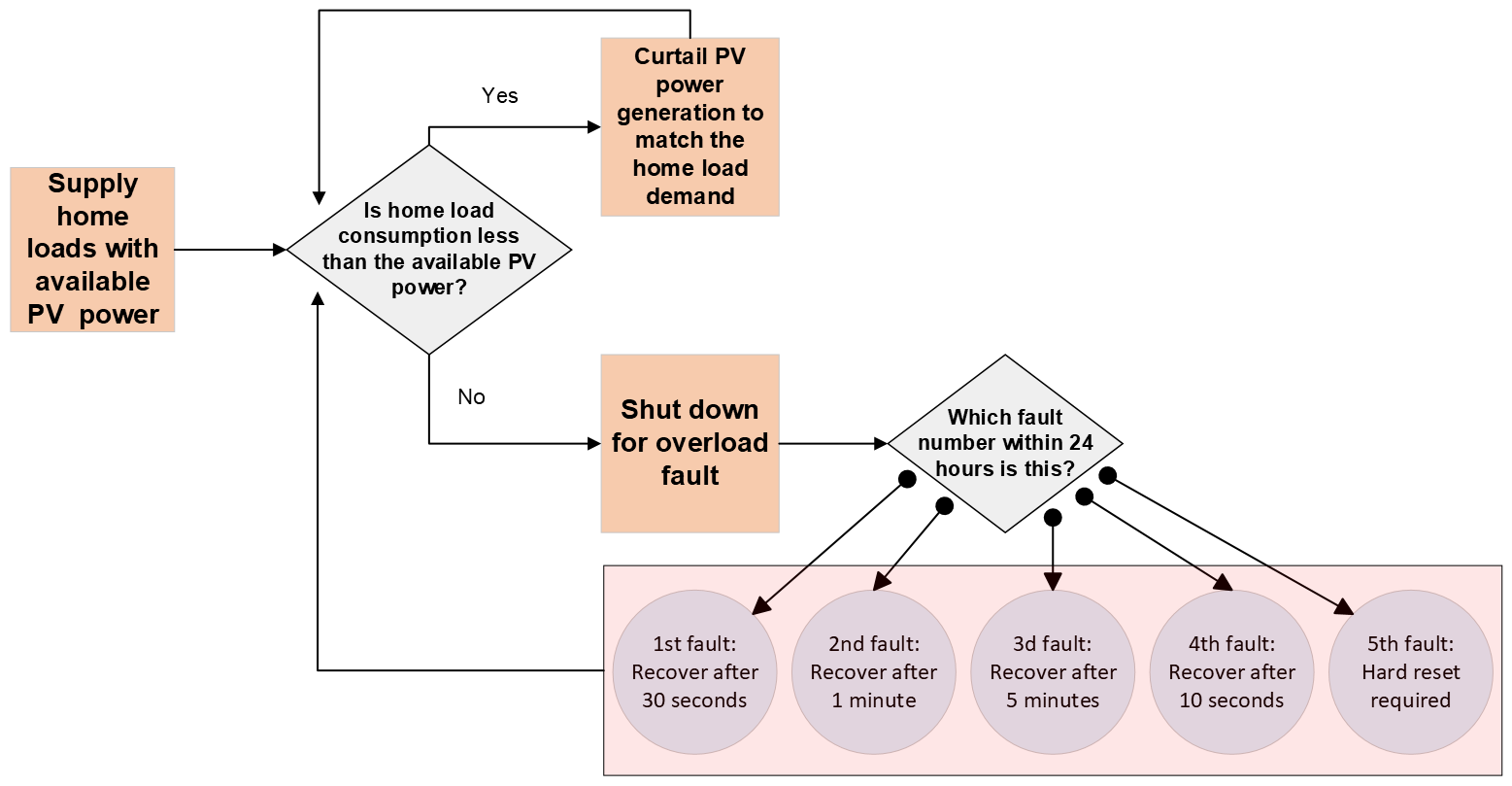
When the load exceeds available PV power, the inverter will:
- Detect an instantaneous power imbalance
- Initiate protective shutdown to prevent unstable voltage and frequency conditions
- Disconnect backup output causing home loads to lose power
After the first fault, the inverter will recover and reenergize the home loads after 30 seconds.
Subsequent faults within 24 hours of the first fault recover as follows:
- Second fault > 1 minutes
- Third fault > 5 minutes
- Fourth fault > 10 minutes
- Fifth fault > requires hard reset
Five faults in 24 hours require a hard reset to be performed. This entails the inverter being disconnected temporarily from both AC and DC power sources until the inverter turns off (LEDs go blank). Following this, the inverter can be reinitialized. Section 7.1 of the User Manual outlines a specific shutdown procedure with respect to doing a hard reset:
Hard Reset Steps
Shutdown
Step 1: Turn off the circuit breaker on the grid side
Step 2: Turn off the DC switch on the inverter
Step 3: Wait a full five minutes
Start-Up
Step 4: Turn on the circuit breaker
Step 5: Turn on the DC switch
Step 6: Wait five minutes for the inverter to reenergize the backup port
Note:
This behavior is intentional and required to:
- Protect connected equipment
- Maintain voltage and frequency stability
- Prevent uncontrolled inverter operation
To avoid these shutdown loops, ensure that only small light loads are connected. Large heavy loads such as air conditioners, pool pumps, and EV chargers should not be supported with PV-only backup. Please reference Section 4.4 of the User Manual.
Recommended Applications
PV-only backup is best suited for:
- Daytime-only critical loads
- Actively managed or shed loads
- Installations with predictable, low-power demand
For applications requiring:
- High inrush loads
- Nighttime backup
- Stable load support in overcast conditions
Installation of a battery is required.
Wiring Layout
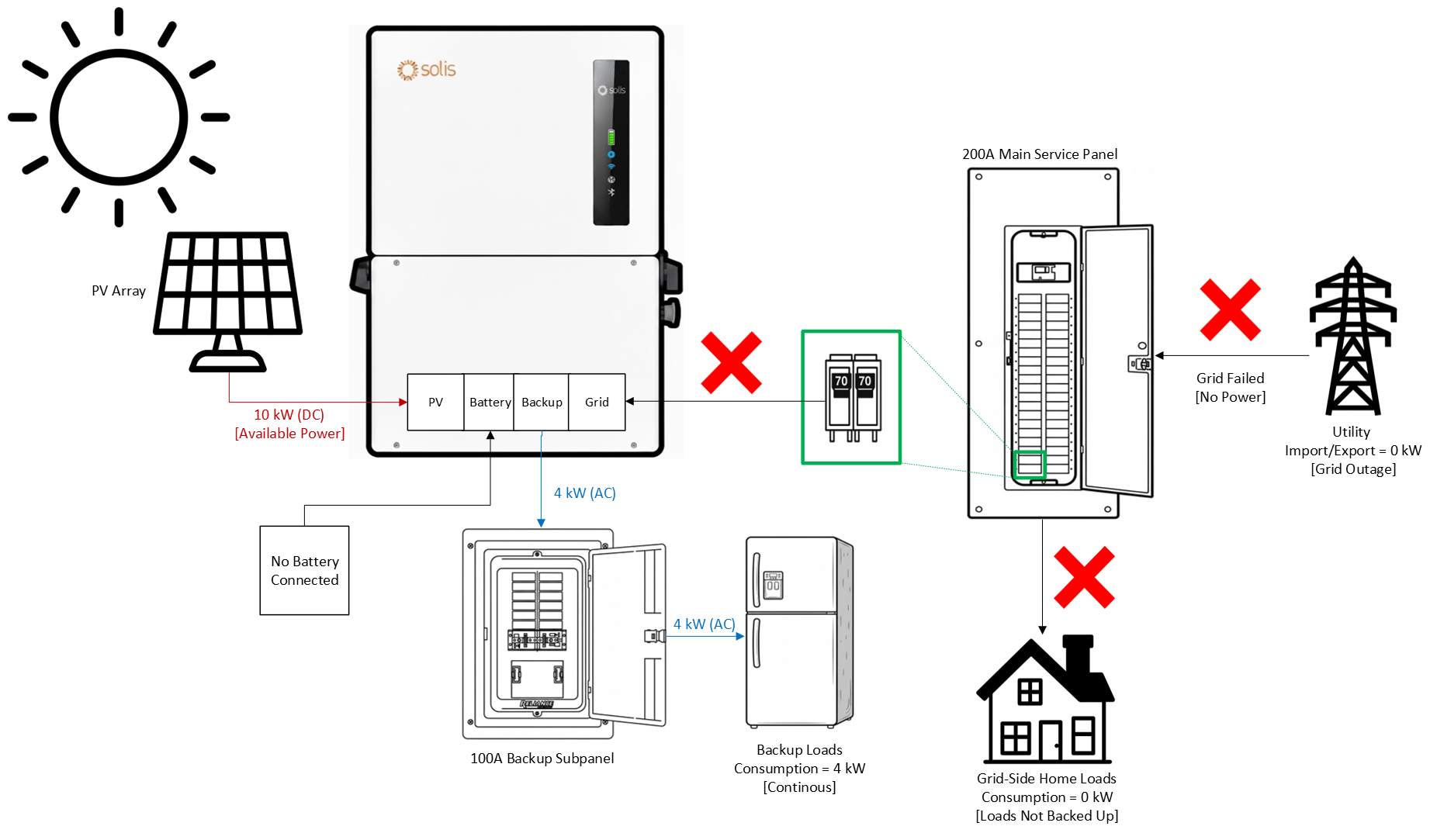
Logic Table
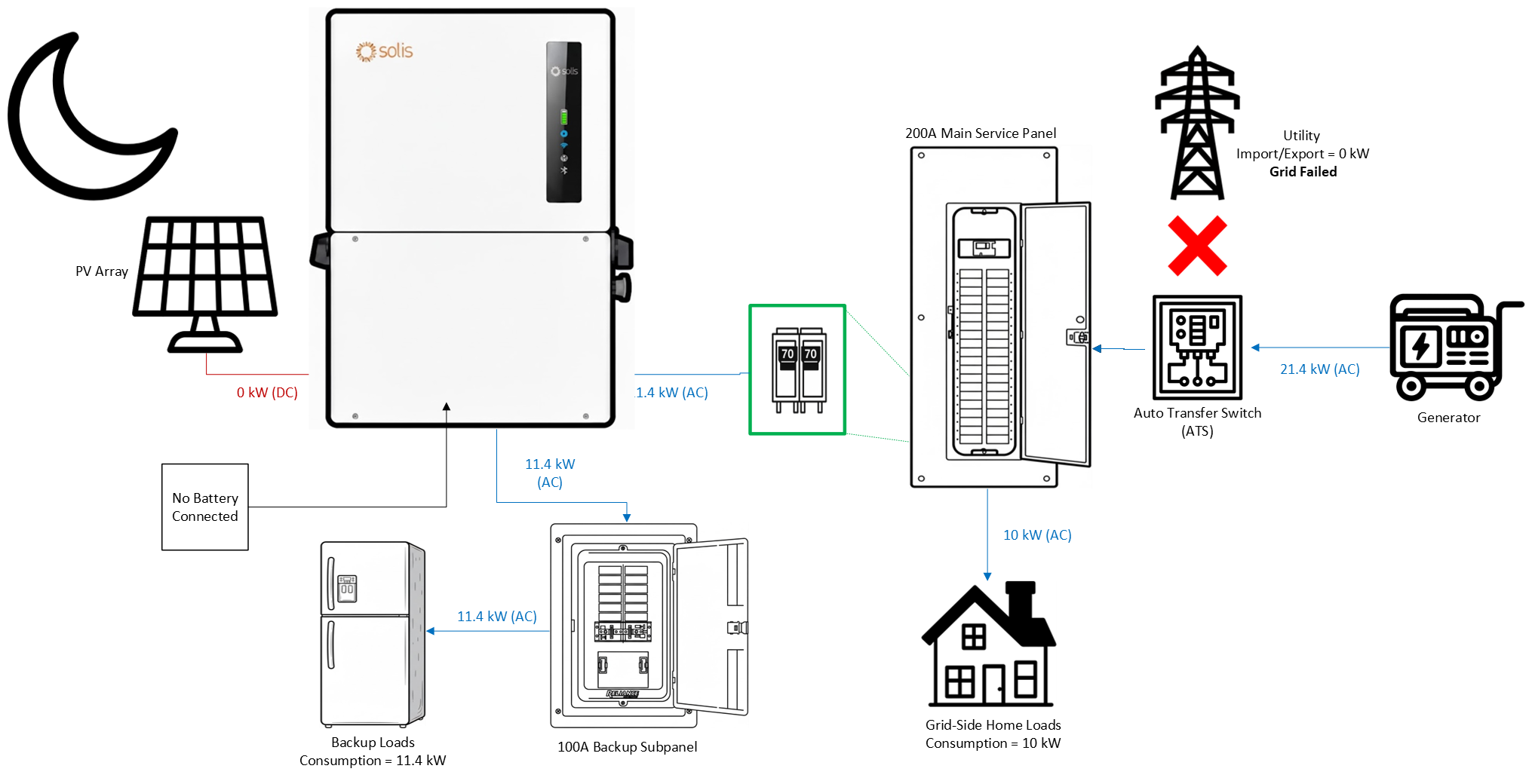
Using a Generator with PV Only and No Battery
A generator can be installed with this inverter using PV only and no battery.
However, there are some caveats and limitations that must be respected:
1. The generator must connect to the Grid side of the inverter, NOT the backup side
Why? The inverter has two AC outputs: (1) Grid and (2) Backup. The backup side is only capable of grid forming and cannot perform grid following. The grid side is the opposite, only able to follow the grid and not form the grid. Since the generator is like the grid, the inverter must follow it. That is why the generator can only be connected to the grid side and not to the backup side.
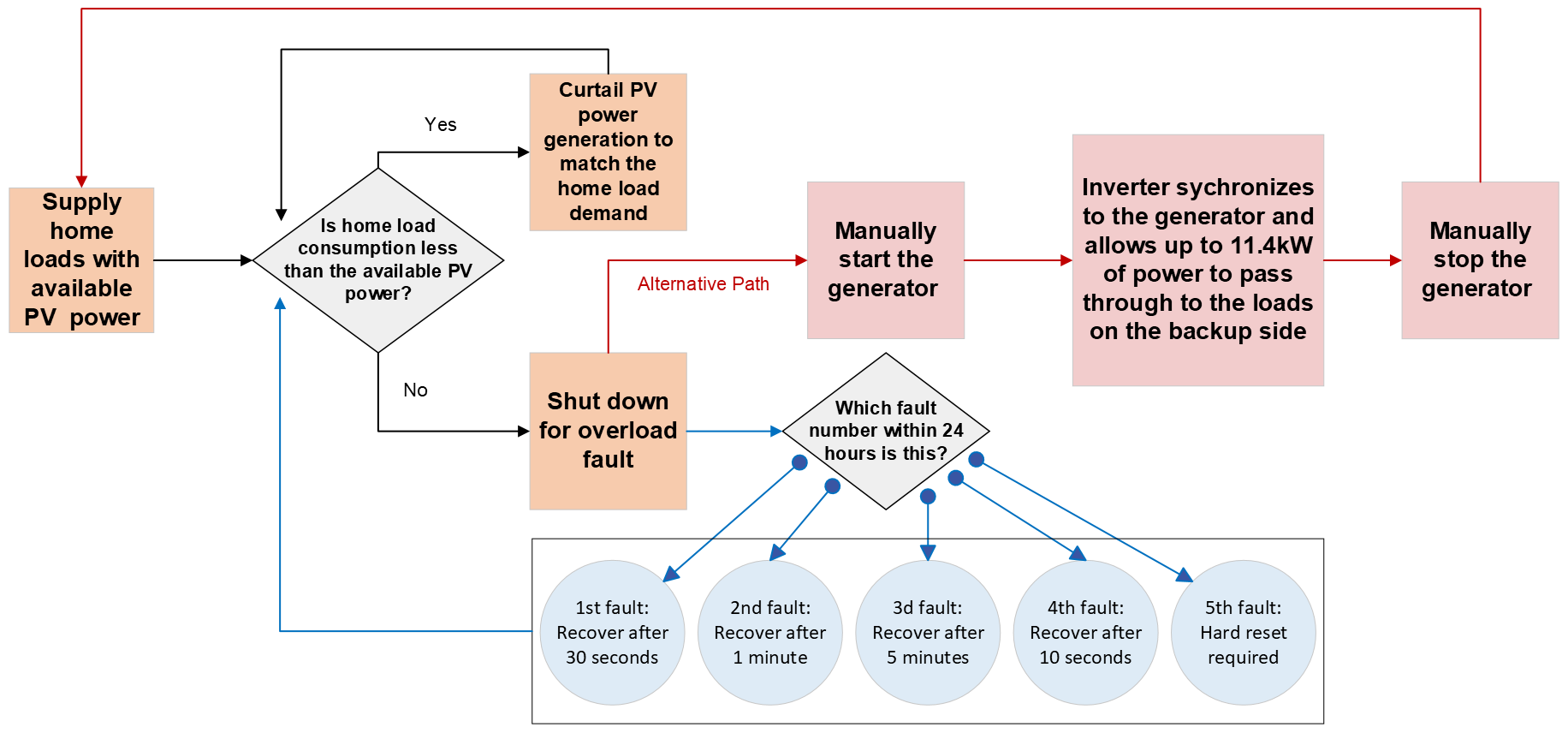
2. Without a battery, the inverter is NOT able to automatically start and stop the generator. This is because the automatic start/stop feature is based on the SOC% of a connected battery. If no battery is connected, the generator must be started and stopped manually or by another controlling device such as an ATS.
3. The homeowner is responsible for starting and stopping the generator. Reiterating the previous point that the inverter will NOT be able to start/stop the generator without a battery.
4. From the inverter perspective, it will not know the difference between grid and generator power.
5. Because of point #4 the export power settings must be configured for zero export whenever the generator is operating.
6. Loads can be connected to the backup side so that they can be supported by PV only when in backup mode.
7. When there is not enough sun to support the loads, the generator should be manually turned on. At this point, the inverter will switch back to grid following mode synchronizing with the generator and allowing power to pass from the generator through to the loads connected to the backup side.
Note: The limit is 47.5A of continuous power that can be supported by passthrough power. If this is not enough, then loads should be left on the grid side of the system so that they can still be supported by the generator without that power passing through the inverter. The catch is those loads cannot be supported with PV-only backup and will be off until the generator is turned on.
Summary
PV-only backup is a powerful feature that enables the Solis hybrid inverter to provide limited load support with PV only and no battery. However, it operates under strict constraints dictated by real-time PV power availability. If home load consumption exceeds instantaneous PV production the result will be that the inverter shuts down as a normal and expected protective response.
It is recommended only to utilize PV-only backup to support small loads in short-duration power outages.
A generator can be added to supplement power, but the rules listed above must be acknowledged and followed.
Link to download the full User Manual: https://www.solisinverters.com/uploads/file/Solis_Manual_S6-EH1P(3,8-11,4)K-H-US_v,5,6_20251021.pdf
Was this article helpful?
That’s Great!
Thank you for your feedback
Sorry! We couldn't be helpful
Thank you for your feedback
Feedback sent
We appreciate your effort and will try to fix the article