Applies to: Solis-1P(3.6-10)K-4G-US residential single-phase grid-tied PV string inverters only.
Important: This article does not apply to any other Solis inverter models, including all Solis hybrid (energy storage) inverters. Hybrid inverters use a different settings layout.
What FailSafe does
FailSafe is a protection feature for systems with strict export power limits, such as zero-export systems. If the inverter loses its CT or external meter readings, it cannot measure how much power is going to the grid. With FailSafe enabled, the inverter then shuts down and stops generating power, so it cannot exceed the export limit.
Do you need FailSafe?
In most cases, no. FailSafe is needed only when the system has an export power limit (for example, zero export) and uses an Acrel meter, CTs or an external export power manager (EPM) to enforce it.
- No export limit or FailSafe not required: disable all three FailSafe settings (see the steps below). A FailSafe alarm will no longer stop the inverter.
- Acrel meter or EPM installed and FailSafe is required: do not disable FailSafe. Troubleshoot the cause of the alarm instead (see If FailSafe is required below).
How to disable FailSafe
The inverter has three FailSafe settings, and all three must be disabled. Open the inverter's remote settings in SolisCloud, then change the settings below.
Step 1: External EPM FailSafe Switch
- In the settings menu on the left, go to EPM Setting → External EPM Setting.
- Find External EPM FailSafe Switch (Modbus address 3316) and click Read to see the current value.
- In the Set Value drop-down, select the disable (OFF) option, then click Save on that row.
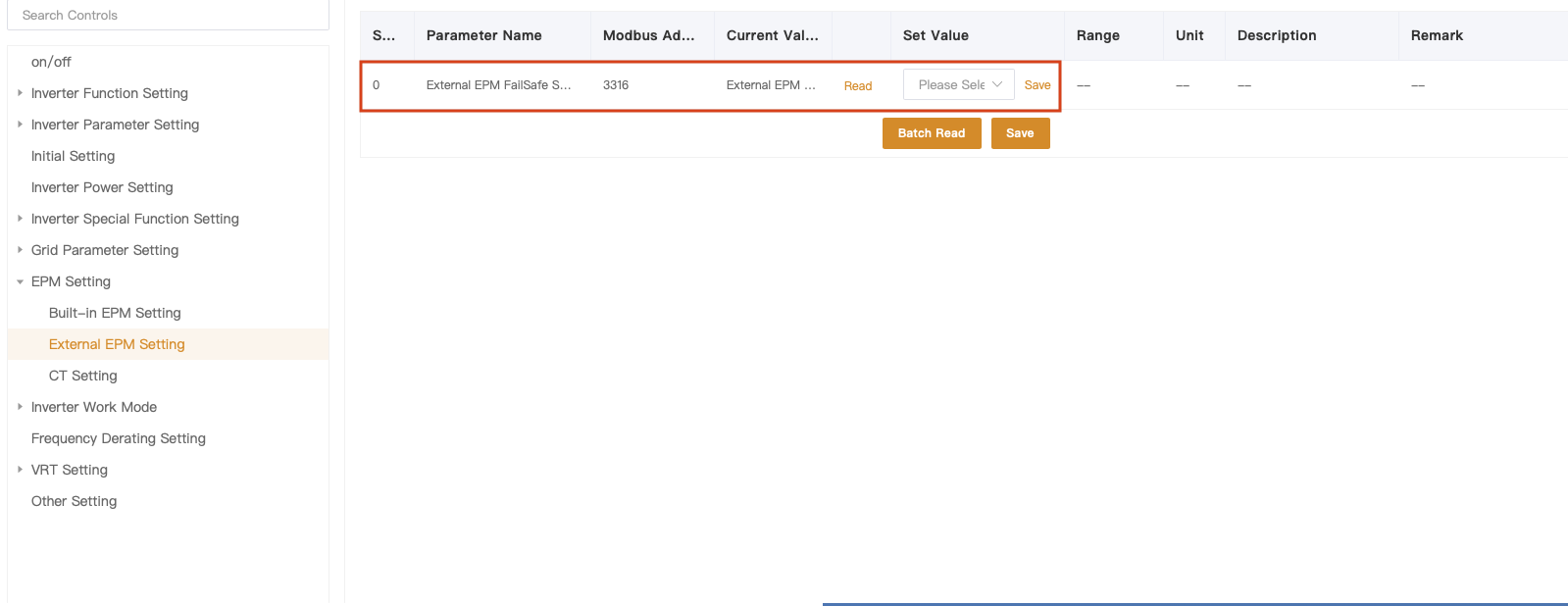
Figure 1. EPM Setting → External EPM Setting: External EPM FailSafe Switch
Step 2: FailSafe Switch and MET-CT FailSafe
- Go to EPM Setting → Built-in EPM Setting.
- Find FailSafe Switch. Click Read. If it shows ON, select OFF in the Set Value drop-down and click Save.
- Find MET-CT FailSafe. Click Read. If it shows ON, select OFF and click Save.
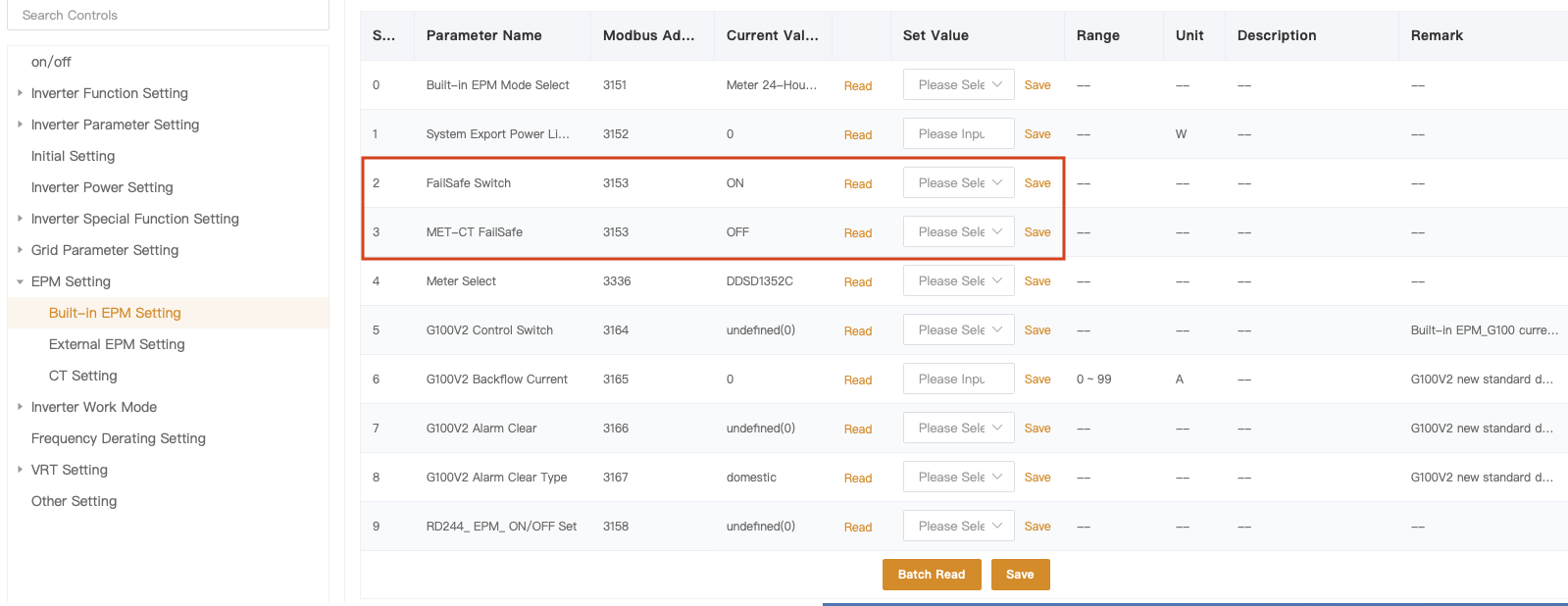
Figure 2. EPM Setting → Built-in EPM Setting: FailSafe Switch and MET-CT FailSafe. In this example, FailSafe Switch is still ON and must be turned OFF.
Step 3: Confirm the settings
On each page, click Batch Read and check that the Current Value of all three FailSafe settings now shows OFF (disabled). If a value has not changed, set it again and click Save on that row.
If FailSafe is required
If the system has an Acrel meter or EPM and must keep FailSafe enabled, leave the settings on and find out why the inverter is reporting the FailSafe alarm:
- Check the CT connections: make sure each CT is fully connected, clamped around the correct conductor, and installed in the correct direction.
- Check the meter communication connections: check the RS485 cable between the meter and the inverter, including the terminations and A/B polarity.
- Find the cause of the alarm: confirm in SolisCloud that the inverter is receiving meter or CT readings. FailSafe trips whenever those readings are lost, so the alarm will continue until communication with the meter or CTs is restored.
If the alarm continues after these checks, contact Solis US Service at usservice@solisinverters.com, or submit a ticket at usservice.solisinverters.com, with the inverter serial number and screenshots of the EPM settings.
Was this article helpful?
That’s Great!
Thank you for your feedback
Sorry! We couldn't be helpful
Thank you for your feedback
Feedback sent
We appreciate your effort and will try to fix the article