Nuisance arc-fault (AFCI) alarms on Solis S6 hybrid inverters are most often caused by module-level optimizers, not real arcs. This article explains how the AFCI works, why optimizers trigger it, how the AFCI sensitivity levels work, and how to troubleshoot an AFCI alarm. It is written for installers and Solis service staff. The sensitivity levels apply to the S6-EH2P (9.6–16 kW, "16K") hybrid.
What the AFCI Does
The AFCI shuts the inverter down when it detects a series arc in the PV wiring, to prevent a fire.
- Code requirement: NEC 690.11 requires a listed PV arc-fault circuit interrupter on PV DC circuits of 80 V or more. The AFCI must never be disabled.
- Standard: Solis S6 hybrids have a Type 1 PV DC AFCI certified to UL 1699B. An arc of 300 W or more must be interrupted within the time UL 1699B allows (2.5 s). In certification testing, the 16K interrupted arcs of 23–514 W in 0.32–1.46 s.
- Self-test: the AFCI runs a self-test before each start.
- Lockout: after five arc-fault detections within 24 hours, the inverter shuts down and must be reset manually.
- Alarm codes: ARC-FAULT (1041) is an arc detection; AFCI-Check (1040) is a failed self-test. AFCI alarms show on the LCD and in the Bluetooth alarm history, and may not appear in SolisCloud.
How the AFCI Detects an Arc
The AFCI does not see an arc directly; it listens for the arc's electrical noise in the PV string current.
- A series arc adds random, broadband noise to the DC current. Sandia National Laboratories found that arcing stands out most clearly from normal noise between about 100 Hz and 100 kHz.
- The AFCI measures the string current, filters it to that band, and calculates how much noise energy is present.
- When the noise stays above a threshold for long enough, it declares an arc. The sensitivity setting sets that threshold.
- Anything else that puts enough noise into the same band can look like an arc to the AFCI. That is the root cause of nuisance trips.
Why Optimizers Cause Nuisance Trips
Optimizers are switching converters, and a string of them produces the same kind of high-frequency noise the AFCI looks for.
- Switching noise: each optimizer (for example, a Tigo TS4-A-O) is a small DC-DC converter switching at tens to hundreds of kHz. Its ripple current and harmonics flow through the whole string.
- Many optimizers add up: a string of 10–15 optimizers switch at slightly different frequencies. Their noise mixes and fills the spectrum, which looks much like arc noise. Sandia measured significantly higher conducted noise when module-level converters were operating.
- Worse in full sun: switching noise grows with string current, so trips are most common on sunny days.
- Worse with shade or mismatch: optimizers switch harder when they are actively optimizing, which adds noise.
- Two MPPTs: the inverter's MPPT and each optimizer's own MPPT adjust at the same time, which can cause current steps that look arc-like.
- Each inverter is different: every inverter filters and measures this noise in its own way, and a hybrid adds its own switching stages (PV boost and battery converter). The same array can run cleanly on one inverter and trip another.
- Power supplies: the 5 V buck converter that powers a Tigo CCA is another high-frequency switcher near the PV wiring.
Solis Recommendation on Optimizers
Solis recommends only using optimizers with S6 hybrid inverters when shading cannot be avoided. If optimizers must be used and nuisance AFCI trips occur, reduce the AFCI sensitivity (next section).
- Rapid shutdown without optimizers: use the integrated or external rapid shutdown transmitter with its matching receivers (for example, the Tigo RSS transmitter with TS4-A-F or TS4-A-2F receivers).
- Tigo CCA and TS4-A-O: the 16K is PVRSS-certified with the Tigo CCA and TS4-A-O optimizers. The CCA must be installed in Tigo's external enclosure and powered at 5 V through a buck converter, never directly from the inverter's 12 V output. The CCA cannot be integrated inside of the inverter.
- Internal transmitter with a CCA: the CCA and TAP reach the optimizers wirelessly, so they do not conflict with the inverter's internal Tigo transmitter. The internal transmitter does not need to be disabled. It only needs to be disabled when a second, external PLC transmitter serves the same array.
AFCI Sensitivity Levels
The AFCI level can be set from 0 to 7, but the numbers are not in order of sensitivity: level 4 is the most sensitive and level 3 is the least sensitive.
- Levels 4–7 alarm immediately when they detect arc-like noise.
- Levels 0–3 double-check a detection before alarming, which filters out more nuisance trips.
- Level 7 is not the lowest setting: a site at 7 that still trips can go to 0, then 1, 2 and 3.
Most sensitive 4 → 5 → 6 → 7 → 0 → 1 → 2 → 3 Least sensitive
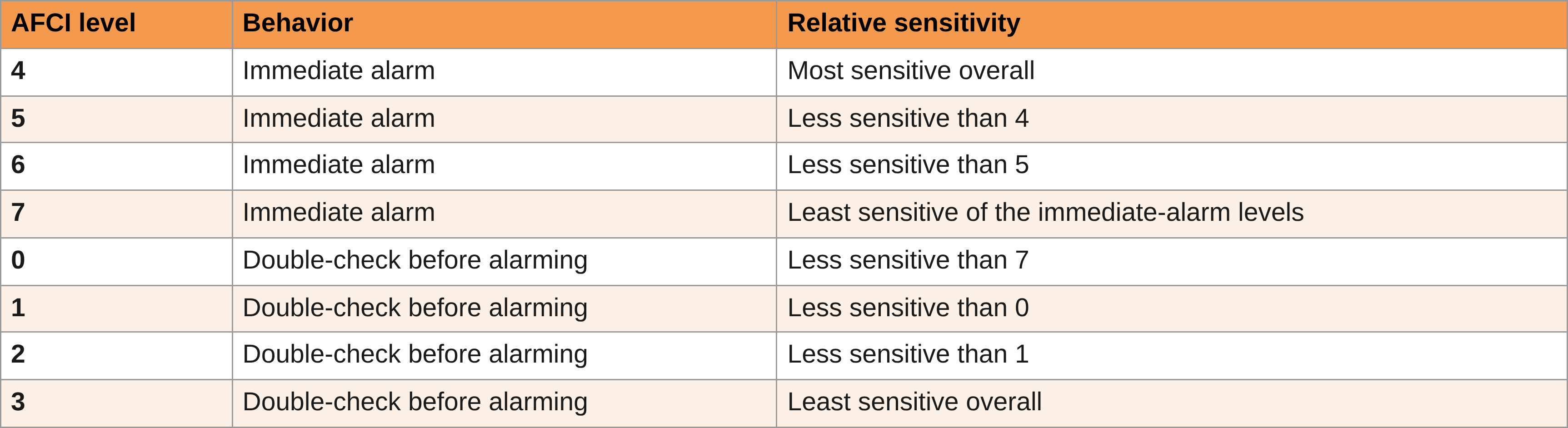
Lowering the sensitivity raises the trip threshold above the optimizer noise. A real arc carries much more energy than that noise, but each step down reduces the safety margin, so lower it only as far as needed. Solis Technical Support can change the setting.
Troubleshooting an AFCI Alarm
Rule out a real arc first, then lower the sensitivity step by step only if the trips are nuisance trips.
- Record the alarm: note the alarm name, code and time from the LCD or the Bluetooth alarm history (ARC-FAULT 1041 or AFCI-Check 1040).
- Update the firmware: some nuisance trips are fixed in later firmware. AFCI firmware can be updated only remotely, through Solis Technical Support.
- Inspect the PV circuits: with the DC switch off and rapid shutdown activated, check for mated connectors of the same brand and type, fully crimped and locked; no damaged insulation, pinched cables or water in junction boxes; and tight PV terminals in the wire box.
- Check for interference: rapid shutdown receivers must match the transmitter, and PV cables should be kept apart from AC cables. Note whether optimizers are installed.
- Isolate the string: reconnect the strings one at a time and run the inverter. The string that trips again has the fault.
- Reset and monitor: reset the lockout at Settings > Professional Settings > Protection Settings > AFCI Reset, then watch for repeat alarms.
- Lower the sensitivity (nuisance trips only): if the wiring checks out and the trips look like nuisance trips (optimizers on the array, trips mostly in full sun), lower the AFCI sensitivity one level at a time in the order 4 → 5 → 6 → 7 → 0 → 1 → 2 → 3. Monitor the site after each change.
- Record every change: note the original level, each new level, the date and whether trips continued.
- Escalate: if the site still trips at level 3, or the alarm is AFCI-Check (1040), contact Solis Technical Support with the site ID, inverter serial number, alarm history and photos of the wire box and PV connectors.
Never disable the AFCI or bypass it to stop nuisance trips.
References
- Solis S6-EH2P(9.6-16)K03-SV-YD-L-US User Manual V3.9: Section 2.5 (Protection Circuitry), Section 5.8 (Rapid Shutdown), Section 7.8 (Arc-Fault Alarms and AFCI sensitivity levels)
- Sandia National Laboratories: Frequency characteristics of PV arc faults
- Sandia National Laboratories: Unwanted tripping of arc-fault detectors with power electronics
Was this article helpful?
That’s Great!
Thank you for your feedback
Sorry! We couldn't be helpful
Thank you for your feedback
Feedback sent
We appreciate your effort and will try to fix the article