Applies to: S6-EH2P9.6K03, 11.4K03, 12K03, 14K03 and 16K03-SV-YD-L-US low-voltage residential hybrid inverters sold in North America.
Symptom
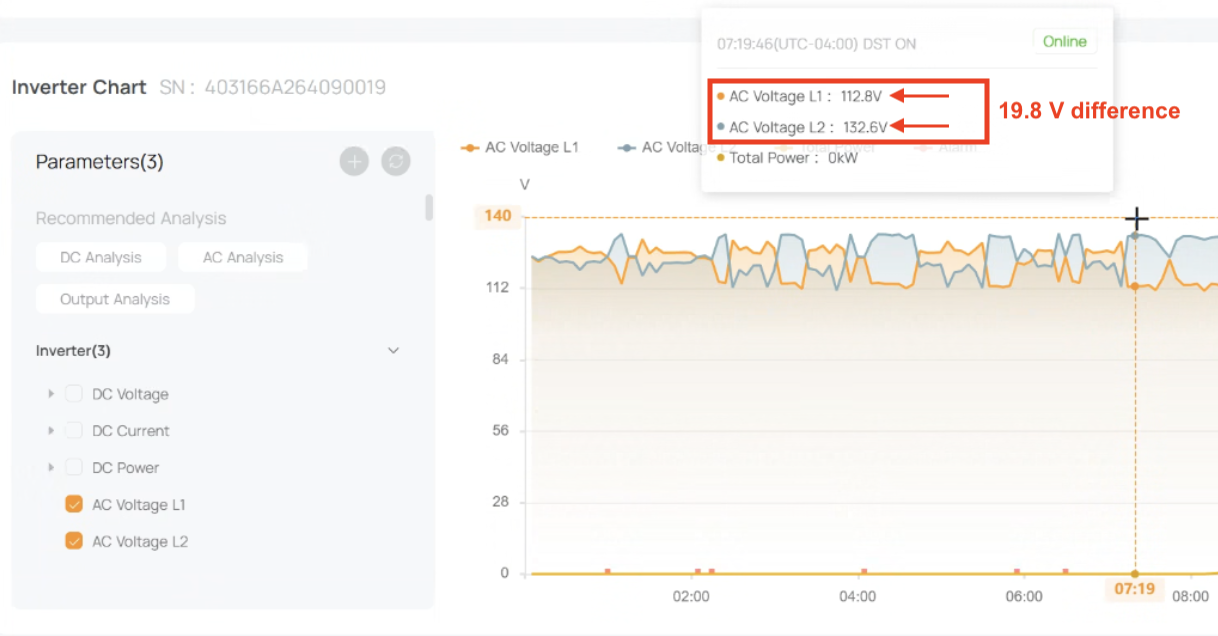
The homeowner reports that lights are flickering, pulsing or flashing. Other loads, such as motors, pumps and appliances, may also run erratically. In SolisCloud, the L1 and L2 AC voltages are noticeably different from each other instead of nearly equal.
| L1 vs L2 AC voltage | |
|---|---|
| Normal | Nearly identical (e.g. both about 120 V) |
| Problem | 5 to 20+ V apart |
Cause
This is an installation issue, not an inverter fault. The most common cause is that the L1 and L2 CTs are swapped: the CT on grid L1 is wired to the inverter’s L2 CT input, and the CT on grid L2 is wired to the L1 input. A reversed CT direction causes the same problem. Either way, the inverter receives the wrong per-phase measurements and creates a voltage imbalance between L1 and L2.
Step 1: Confirm the issue in SolisCloud
- Open the site in SolisCloud and go to the inverter’s AC data.
- Compare the AC voltage on L1 and L2. If they differ by several volts or more, continue with the steps below.
Step 2: Update the firmware
Make sure the inverter is running the latest firmware. Many issues on this series are resolved only by the latest versions.
- Current versions: DSP [0BA1], HMI [CA03], LCD [xx]
- The 9.6K model uses [A2] instead of [A1]; all other versions are the same.
- The latest firmware is available on the Solis support portal: [link]
Step 3: Correct the CT installation
With the system safely powered down:
- Confirm the CT on grid L1 is wired to the inverter’s L1 CT input, and the CT on grid L2 to the L2 CT input. Swap them if they’re reversed.
- Confirm each CT’s arrow points [toward the grid].
- Confirm Device Settings > CT ratio is set to 5000. Any other value causes incorrect readings and incorrect export control.
Step 4: Run the CT auto-correction
After the wiring is corrected, run the CT adaptive auto-correction, following the steps in [application note name/link].
- Until November 17, 2026: the auto-correction is sent by Solis Technical Support as a remote command. Contact us with the site ID once the CT wiring has been corrected.
- From November 17, 2026: the CT auto-correction setting will be available in the standard SolisCloud settings.
Step 5: Check the other common setup mistakes
- Storage mode: must be set (e.g. Self-Use, [Feed-in Priority] or Off-Grid). Do not leave it undefined, or the inverter won’t know how to operate.
- Neutral: must always be connected.
- Grid Load Bypass (Functional Settings): must be enabled.
- CT ratio: 5000 (see Step 3).
Verify the fix
In SolisCloud, L1 and L2 voltages should now be nearly identical, and the flickering should stop right away.
If the problem continues, rule out two other known causes of flickering: an overloaded backup port, and a missing neutral on the backup circuit. Then open a ticket with the site ID, inverter serial number and model, plus screenshots of the L1/L2 voltage readings.
Was this article helpful?
That’s Great!
Thank you for your feedback
Sorry! We couldn't be helpful
Thank you for your feedback
Feedback sent
We appreciate your effort and will try to fix the article